
Use Applications
Nobody wakes up wanting an RFID printer or a rugged PDA. They wake up to a print room full of VOID labels, a dock door that still reads one carton at a time, and pickers whose scanners died before break. These guides start from those problems — root causes first, published industry data where it exists, honest limits where vendors usually go quiet — and only then map the JNXRFID hardware that fixes them.
Problem Guides
Which Problem Brought You Here?
RFID Printer Printing VOID?
Tags print fine but won't encode — inlay not detected, wrong memory bank, missing calibration after a roll change, or a template that never asked for a write. The four root causes, a 5-point pre-flight checklist, and a print–encode–verify bench.
Fix the VOID problem → Pain: dead batteries, slow scansScanners Dying Mid-Shift?
Battery failure is the #1 frontline device complaint — but unstable replacement cells mimic broken devices. Quantified error and productivity costs, a battery-vs-device diagnostic, and models sized for the worst shift.
Diagnose the fleet → Pain: slow verify & returnsReader Workflows: Verify Faster
Encoding stations, retail checkout verification, returns processing, click-and-collect, and smart lockers — five reader-centric workflows with typical results, on the homepage.
Explore reader workflows →Industry Use Cases
Which industry are you in?
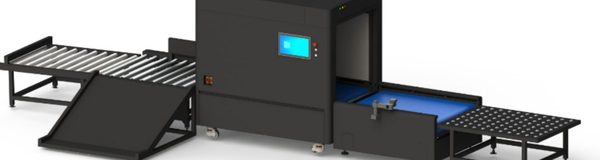
Supply chain & logistics
A dock door that reads the whole pallet, not one carton at a time.
Read the page →
Manufacturing & industrial tooling
Every tool back in its slot before the shift closes.
Read the page →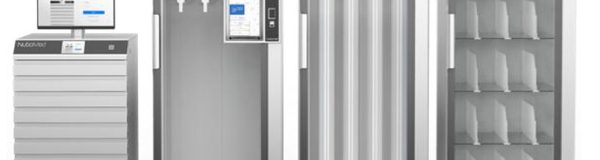
Healthcare & hospital SPD
High-value consumables visible from the storeroom to the theatre.
Read the page →
Apparel & fashion retail
Every garment counted at the door, in the second it takes to walk through.
Read the page →
New energy & utilities
One tag follows the asset from cell production to the substation.
Read the page →

Public sector & public assets
A fixed-asset count that finishes the same day it starts.
Read the page →
Aviation MRO & ground support
Life vests, tools and rotables checked before the aircraft is released.
Read the page →
Anti-counterfeiting & traceability
One tag, one identity, from the factory floor to the last mile.
Read the page →
How These Guides Work
Pain → Root Cause → Checklist → Hardware
- Root causes, not brochures. Each guide opens with what actually goes wrong — drawn from vendor support communities, trade press, and field service reports — and cites its sources.
- Honest limits. Where a technology fails (UHF through liquid, ordinary inlays on metal), the guide says so and gives the mitigation or the “don't do it” answer.
- Hardware last, mapped to the pain. JNXRFID models appear only after the problem is understood — battery sized for the worst shift, encode-verify bench for VOID prevention, antenna placement for a dense-metal aisle.
- Prove it cheaply. Every guide ends the same way: an evaluation unit in your environment for 1–2 weeks with an engineer on call — decide on data, not on a datasheet.
JNXRFID RFID readers are powered by the genuine Zebra RE40 module, and JMD mobile computers use genuine Zebra SE-series scan engines — so integration teams can plan against familiar SDKs. JNXRFID printers use their own RFID modules and are positioned as a compatible-workflow alternative, not as Zebra products.
Reference Table
Use Applications at a Glance
| Industry / application | What good looks like | Typical site configuration | UHF band | Guide |
|---|---|---|---|---|
| Supply chain & logistics | A dock door that reads the whole pallet, not one carton at a time. | Dock door gateways · Fixed readers and antennas · All-in-one readers · Handheld | 902-928 MHz (US) / 865-868 MHz (EU) | Read the page |
| Manufacturing & industrial tooling | Every tool back in its slot before the shift closes. | Tool and instrument cabinets · Key cabinets · Smart shelves · Line-side reading | 902-928 MHz (US) / 865-868 MHz (EU) | Read the page |
| Healthcare & hospital SPD | High-value consumables visible from the storeroom to the theatre. | Medical cabinets · Smart shelves · Desktop readers · Storeroom reading and handheld | 902-928 MHz (US) / 865-868 MHz (EU) | Read the page |
| Apparel & fashion retail | Every garment counted at the door, in the second it takes to walk through. | Shop doorways and fitting rooms · Goods-in and the stockroom · Ticket encoding · Counting the floor | 902-928 MHz (US) / 865-868 MHz (EU) | Read the page |
| New energy & utilities | One tag follows the asset from cell production to the substation. | Production line · Warehouse in and out · Substation tools and test gear · Handheld and tablet | 902-928 MHz (US) / 865-868 MHz (EU) | Read the page |
| Banking & archives | Every file accounted for, without opening a drawer. | File cabinets · Shelving · Keys and valuables · Issue desks and handheld | 902-928 MHz (US) / 865-868 MHz (EU) | Read the page |
| Public sector & public assets | A fixed-asset count that finishes the same day it starts. | Large stores and high-value rooms · Wall-to-wall counting · Shelving · Rooms and racks | 902-928 MHz (US) / 865-868 MHz (EU) | Read the page |
| Aviation MRO & ground support | Life vests, tools and rotables checked before the aircraft is released. | Tool and test-gear control · Open storage · Bay and stores reading · Walk-through checks | 902-928 MHz (US) / 865-868 MHz (EU) | Read the page |
| Anti-counterfeiting & traceability | One tag, one identity, from the factory floor to the last mile. | Encoding the identity · Checking at the desk or the door · Fixed reading · In the field | 902-928 MHz (US) / 865-868 MHz (EU) | Read the page |
| How we deliver | Hardware that drops into the system you already run. | Fixed readers and antennas · Gateways · Desktop readers · Handhelds and tablets | 902-928 MHz (US) / 865-868 MHz (EU) | Read the page |
FAQ
Frequently Asked Questions
Where do these application guides start?
Nobody wakes up wanting an RFID printer or a rugged PDA. They wake up to a print room full of VOID labels, a dock door that still reads one carton at a time, and pickers whose scanners died before break. These guides start from those problems — root causes first, published industry data where it exists, honest limits where vendors usually go quiet — and only then map the JNXRFID hardware that fixes them.
Which reader module and scan engines does JNXRFID use?
JNXRFID RFID readers are powered by the genuine Zebra RE40 module, and JMD mobile computers use genuine Zebra SE-series scan engines — so integration teams can plan against familiar SDKs. JNXRFID printers use their own RFID modules and are positioned as a compatible-workflow alternative, not as Zebra products.
How is each guide structured?
Pain → Root Cause → Checklist → Hardware
What if my workflow is not listed?
Tell us what you're tagging, scanning, or printing — and where. We'll map it to hardware, or tell you honestly if we're not the right fit. Response within 24 hours.
Don't See Your Workflow?
Tell us what you're tagging, scanning, or printing — and where. We'll map it to hardware, or tell you honestly if we're not the right fit. Response within 24 hours.
Contact JNXRFID