
RFID Encoding Printers
Print, encode, and verify RFID tags in a single pass. JNXRFID RFID encoding printers cover UHF retail programs and HF/NFC authentication workflows — with free LabelSoft software, flexible media support including on-metal RFID tags, and low minimum order quantity.
Overview
What Is an RFID Encoding Printer?
An RFID encoding printer (also called an RFID label printer or RFID printer-encoder) writes data to the chip inside an RFID inlay while it prints the human-readable label. For retail RFID programs, source-tagging operations, and authentication labeling, this is the machine that turns blank inlays into deployed, sellable RFID tags.
JNXRFID offers five RFID encoding printers across two technologies. Our UHF models (JD240TR, JT240TR) handle EPC Gen2v2 / ISO 18000-63 tags for retail inventory and logistics. Our HF/NFC models (JD240THR, JT240THR) encode ISO 15693 and ISO 14443A tags used in brand authentication, product provenance, and NFC customer engagement.
Field Failures
Why RFID Labels Print VOID — the Root Causes
A black VOID stripe across a finished label means wasted media and a tag you cannot ship. Public printer-support documentation across the industry keeps circling back to the same root causes — worth knowing before any purchase decision:
The three causes support guides cite most
① The encoder cannot detect the tag's antenna — usually a calibration issue; both media and RFID calibration must be run after every media change. ② Encoding the wrong memory bank — many inlays have EPC and TID memory but no User Memory; writing to a bank the chip doesn't have fails every time. ③ Memory size insufficient — a 96-bit EPC holds 24 hex characters; exceeding the chip's capacity voids the tag. All three are resolved by matching the data structure to the tag's spec sheet before the print run.
The fourth cause gets missed: duplicate EPC cross-talk
If encoded tags later show identical EPCs despite a serialized counter, the encoder's write power was set too high — the RF field leaked past the intended label and wrote the next tag on the roll with the same data. Under retail item-level mandates, duplicate tags leaving a facility are the supplier's problem and the supplier's cost. Write power must confine the field to the single tag over the antenna.
The baseline nobody plans for: dead inlays
Inlay manufacturing yields are good but not perfect — a small percentage of tags on any roll simply won't encode. A production printer needs automatic per-tag verification, void marking, and a reprint path, so failures are caught at the printer instead of at the retailer's receiving dock.
Every JNXRFID RFID printer verifies each tag after writing and rejects failures automatically — and we validate your specific inlay on the exact printer before your unit ships. For unprinted tags (assets, tools, returns desks), see our RFID tag encoding station guide. Tagging metal surfaces with ferrite-backed labels? See our on-metal RFID label printer guide.
Product Lineup
Which RFID Encoding Printer Fits Your Workflow?
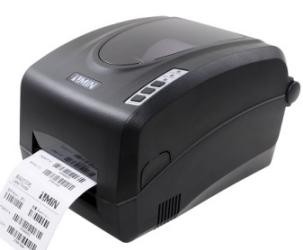 UHF Desktop
JD240TR
4-inch desktop UHF RFID printer with on-metal tag support and free LabelSoft software. The workhorse for retail tagging programs.
View JD240TR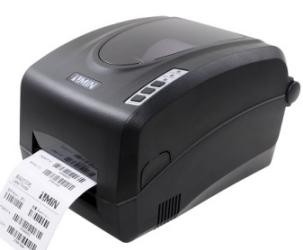 HF/NFC Desktop
JD240THR
Desktop HF/NFC RFID printer for authentication and NFC encoding — ISO 15693 / 14443A in a compact footprint.
View JD240THR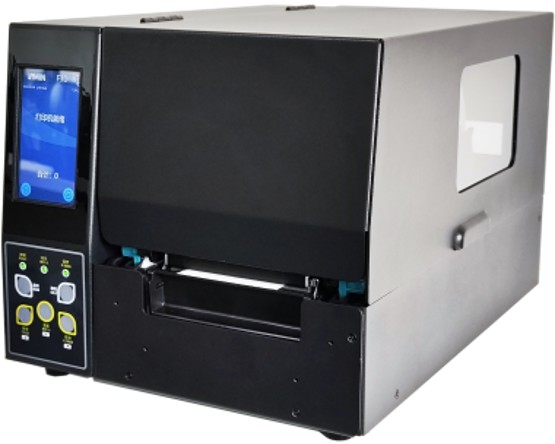 Industrial UHF
JT240TR
Industrial UHF RFID printer with 600 dpi, 1.5 mm media support, and high-volume duty cycles for production lines.
View JT240TR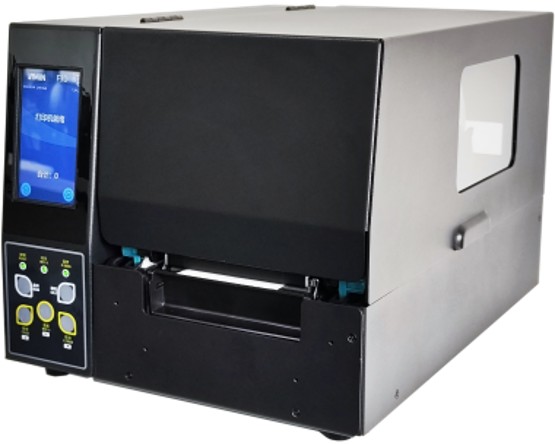 Industrial HF/NFC
JT240THR
Industrial HF/NFC encoder for high-volume authentication programs and NFC tag production.
View JT240THRLineup Comparison
RFID Encoding Printer Lineup — Specifications at a Glance
| Specification | JD240TR | JD240THR | JT240TR | JT240THR |
|---|---|---|---|---|
| Printing method | Direct thermal & Thermal transfer | Direct thermal & Thermal transfer | UHF RFID, Direct thermal & Thermal transfer | HF RFID, Direct thermal & Thermal transfer |
| Resolution | JD240TR-2U: 203 DPI (8 dots/mm); JD240TR-3U: 300 DPI (11.8 dots/mm); JD240TR-6U: 600 DPI (24 dots/mm) | JD240THR-2U: 203 DPI (8 dots/mm); JD240THR-3U: 300 DPI (11.8 dots/mm); JD240THR-6U: 600 DPI (24 dots/mm) | JT240TR-F2: 203 DPI (8 dots/mm); JT240TR-F3: 300 DPI (11.8 dots/mm); JT240TR-F6: 600 DPI (24 dots/mm) | JT240THR-F2: 203 DPI (8 dots/mm); JT240THR-F3: 300 DPI (11.8 dots/mm); JT240THR-F6: 600 DPI (24 dots/mm) |
| Max. print width | JD240TR-2U: 4.25" (108 mm); JD240TR-3U/6U: 4.15" (105.6 mm) | JD240THR-2U: 4.25" (108 mm); JD240THR-3U/6U: 4.15" (105.6 mm) | JT240TR-F2: 4.25" (108 mm); JT240TR-F3/F6: 4.15" (105.6 mm) | JT240THR-F2: 4.25" (108 mm); JT240THR-F3/F6: 4.15" (105.6 mm) |
| Max. print length | JD240TR-2U: 157.5" (4000 mm); JD240TR-3U/6U: 78.7" (2000 mm) | JD240THR-2U: 157.5" (4000 mm); JD240THR-3U/6U: 78.7" (2000 mm) | JT240TR-F2: 157.5" (4000 mm); JT240TR-F3/F6: 78.7" (2000 mm) | JT240THR-F2: 157.5" (4000 mm); JT240THR-F3/F6: 78.7" (2000 mm) |
| Memory | 8 MB Flash ROM, 16 MB SDRAM | 8 MB Flash ROM, 16 MB SDRAM | 32 MB Flash ROM, 16 MB SDRAM | 32 MB Flash ROM, 16 MB SDRAM |
| Interfaces | RS-232, USB, Ethernet | RS-232, USB, Ethernet | USB, Ethernet | USB, Ethernet |
| Weight | JD240TR-2U: 2.85 KGS; JD240TR-3U/6U: 2.95 KGS | JD240THR-2U: 2.85 KGS; JD240THR-3U/6U: 2.95 KGS | 12.5 KGS | 12.5 KGS |
Values are reproduced verbatim from each model's specification table on this site; variant-dependent figures are listed per model variant.
Buying Guide
How to Choose an RFID Encoding Printer
1. Match the frequency to your program
Retail inventory programs (apparel, sports gear, general merchandise) use UHF EPC Gen2. Brand protection, anti-counterfeiting, and consumer-NFC engagement use HF / NFC. If you serve both, you need one of each — or talk to us about a mixed fleet.
2. Check your tag media — especially on-metal
Not every printer encodes every tag. Thick inlays and on-metal RFID tags need a printer rated for 1.5 mm+ media — all JNXRFID industrial models qualify, and our desktop models cover standard inlays. Send us your tag spec sheet and we'll confirm compatibility before you order.
3. Verify encoding quality control
A good encoding printer verifies every tag after writing and rejects failures automatically. Look for per-tag EPC writing, lock/unlock support, and void-label handling — standard on all JNXRFID RFID printers.
4. Budget for software, not just hardware
Competing printers often require paid label software subscriptions. Every JNXRFID printer ships with LabelSoft free of charge — template design, database connectivity, and RFID encoding settings included.
Technical resources
Free technical guides for this decision
VOID labels, the calibration cycle and the 16 mm inlay pitch are the three questions that decide whether an encoding project runs or stalls. Both guides work through them in order.
- Six numbers that change decisions — why +3 dB buys only about a fifth more range, and the TID prefixes that confirm which chip you actually received
- Seven operating rules — calibrate on every roll change, verify independently, and stop promising a 100 % read rate
Both guides are free PDFs with no form to fill: the 33-page buyer's guide and the on-metal guide.
FAQ
Frequently Asked Questions
What is an RFID encoding printer?
An RFID encoding printer prints the visible label and writes data to the RFID inlay's chip in the same pass. This lets you commission EPC codes, user-memory data, or NFC payloads at the same station where labels are produced, with automatic verification of every tag.
Do JNXRFID printers work with label templates from other vendors?
JNXRFID printers are built as an alternative for existing vendor workflows — compatible label templates and common print languages mean minimal re-engineering if you're adding capacity alongside an existing fleet. Note: JNXRFID printers use their own RFID modules. Only JNXRFID JRE-series RFID readers are powered by the Zebra RE40 module.
Can you print and encode on-metal RFID tags?
Yes. Our industrial models support media up to 1.5 mm thick, which covers most on-metal tag constructions. On-metal tags are a specialty of ours — send your tag specification and we'll validate it on the exact media before shipping your unit.
What is the minimum order quantity?
There is low MOQ. You can order a single evaluation unit, run it in your workflow for 1–2 weeks with engineering support, and scale when you're ready.
Which software do I need?
Every printer includes LabelSoft at no cost — label design, database binding, and RFID encoding configuration. Third-party software that speaks standard print languages also works.
Why do my RFID labels keep printing VOID?
The most common causes: the encoder cannot detect the tag antenna (run media + RFID calibration after every media change), data is written to a memory bank the chip doesn't have (check the tag's spec sheet), or the data exceeds the chip's memory capacity. If encoded tags later show duplicate EPCs, write power is set too high and leaking to the next label on the roll. We validate your inlay on the exact printer before shipment to remove most of these variables up front.
Is an RFID encoding printer the same as an "RFID label maker"?
Colloquially, yes — both terms describe hardware that produces RFID smart labels. Strictly, an RFID label maker should both print the label and write unique, verified data (an EPC) to the chip in one pass. That matters under retail item-level mandates, which require every tag leaving a facility to be uniquely encoded and verified — printing a label with an unverified or duplicate chip is the failure mode that costs suppliers chargebacks.
What percentage of RFID inlays on a roll fail to encode?
Inlay manufacturing yields are good but not perfect — industry support documentation treats a small failure percentage per roll as normal. That's why per-tag verification with automatic void marking and reprint is standard on every JNXRFID printer: failures are caught at the printer, not at the retailer's receiving dock.
Test an RFID Encoding Printer in Your Own Workflow
Evaluation unit in 1–2 weeks, engineering support included, low MOQ. Response within 24 hours.
Request an Evaluation Unit