
On-Metal RFID Label Printers
On-metal RFID labels survive on the surfaces ordinary inlays can't — but they are thicker, stiffer, and detune differently when encoded. This guide covers how metal-mount labels are printed and encoded, what to check before you commit, and which JNXRFID printer-encoder or reader fits the workflow.
Overview
What Is an On-Metal RFID Label?
An on-metal (metal-mount) RFID label is a UHF inlay built with a ferrite or foam spacer layer between the antenna and the adhesive face. The spacer insulates the tag from the metal surface, so the tag keeps reading reliably when applied directly to metal — where a standard inlay would be detuned and go dark.
You meet these labels wherever assets are metal and hard to revisit: tool and fixture tracking, IT and server assets, warehouse racking, returnable transport items, kitchen and medical equipment, pipelines, and outdoor installations. Because the same label is usually expected to carry a printed serial number, barcode, or human-readable asset ID, most deployments need the label to be printed and encoded — not just programmed.
What's Different
Why Printing and Encoding On-Metal Labels Isn't Standard Work
The media is thicker and stiffer
Ferrite-backed labels have a different caliper and bend profile than standard inlays. A printer media path that handles 2-mil labels happily can jam, skew, or misfeed on metal-mount media. Check the printer's media tolerance against your exact label spec before committing.
The ferrite layer changes antenna tuning
The spacer that lets the tag read on metal also changes how it couples to the encoder's RF field. Encoding power that works for standard inlays may be marginal or excessive for metal-mount media. Look for adjustable encode power and vendor support for tuning to the exact label — not a one-size default.
Write verification is not optional
On-metal deployments usually run for years on assets that are expensive to revisit. A tag written but never verified can carry wrong data for its entire life. Read-back comparison at the point of encoding — write, re-read, compare bit-for-bit — is the step that separates a deployable program from a support nightmare.
Print quality still has to carry the workflow
The RFID write is invisible; the printed serial number and barcode are what operators scan daily. Match print resolution (203 dpi suits most asset labels; 300 dpi for dense serial data) and confirm the label's top coating is compatible with your print method.
Buying Guide
Choosing the Workflow: Print-and-Encode vs. Encode-Only
Workflow A: printer-encoder (print + encode in one pass)
Choose this when labels must carry variable printed data — serial numbers, barcodes, asset IDs — or when you tag at scale and want one device doing both jobs. Verify three things before you buy: media-path tolerance for your label's thickness, adjustable encode power for the ferrite-backed antenna, and read-back verification after each write.
Workflow B: desktop encoding station (encode + verify)
Choose this when on-metal tags arrive pre-laminated from your label supplier and only need EPC programming plus verification — common in asset registration, tool crib check-in, and relabeling. A desktop reader/writer with a controlled read zone does the job at a lower cost than a printer-encoder, and pairs naturally with commissioning software and a reject tray.
Many deployments use both
A printer-encoder produces the labeled stock; a desktop station re-programs, verifies, or re-registers tags in the field. Both share the same data source, so plan the EPC namespace once.
Build It
Build the On-Metal Workflow with JNXRFID
For encoding verification stations, UHF desktop readers are powered by the genuine Zebra RE40 module. JNXRFID printer-encoders use JNXRFID's own print and encode modules.
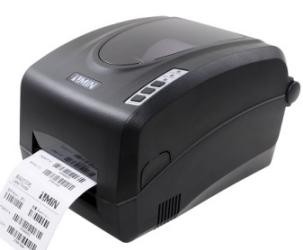 UHF · Desktop Printer-Encoder
JD240TR
Desktop UHF RFID printer-encoder for on-metal label programs at bench scale — print serials and barcodes, encode, and verify in one pass. Includes free LabelSoft label design software.
View JD240TR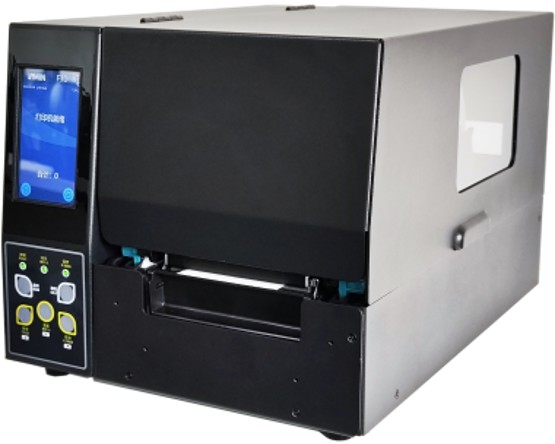 UHF · Industrial Printer-Encoder
JT240TR
Industrial UHF RFID printer-encoder for high-volume metal-mount labeling — rugged duty cycle, large media capacity, and continuous batch encoding.
View JT240TR
JRE443
Desktop reader/writer powered by the Zebra RE40 module — the anchor for encode-and-verify stations handling pre-laminated on-metal tags.
View JRE443
JRE422
Compact reader/writer with a customizable reading zone — one-tag-at-a-time verification where counter space is tight and singulation matters.
View JRE422Lineup Comparison
On-Metal Label Program — Model Selection
| Model | Device type | Role in the on-metal workflow |
|---|---|---|
| JD240TR | UHF · Desktop Printer-Encoder | Desktop UHF RFID printer-encoder for on-metal label programs at bench scale — print serials and barcodes, encode, and verify in one pass. Includes free LabelSoft label design software. |
| JT240TR | UHF · Industrial Printer-Encoder | Industrial UHF RFID printer-encoder for high-volume metal-mount labeling — rugged duty cycle, large media capacity, and continuous batch encoding. |
| JRE443 | UHF · Verification Station | Desktop reader/writer powered by the Zebra RE40 module — the anchor for encode-and-verify stations handling pre-laminated on-metal tags. |
| JRE422 | UHF · Compact Station | Compact reader/writer with a customizable reading zone — one-tag-at-a-time verification where counter space is tight and singulation matters. |
Device types and roles are reproduced from the model cards above.
Related Guides
- Why the module matters: Desktop readers powered by the Zebra RE40 module
- For printed smart labels at scale: RFID encoding printers (print + encode + verify in one pass)
- For pre-made tags and low-volume programs: Build an RFID tag encoding station
- Choosing the reader: Desktop RFID reader/writer buying guide
Technical resources
Free technical guides for this decision
This page covers the workflow. The on-metal guide covers the physics underneath it — why a standard inlay loses most of its range on steel, and why the fix costs what it costs.
- Four numbers — the share of range a conventional inlay loses on steel, and the media class that fixes it
- The validation protocol — how to prove a programme works when no third-party certificate covers the converted label
Free PDF, no registration: Tagging Metal Assets with UHF RFID (18 pages) and UHF RFID Printer-Encoders (33 pages).
FAQ
Frequently Asked Questions
What is an on-metal RFID label?
A UHF RFID label built with a ferrite or foam spacer between the antenna and the adhesive face. The spacer insulates the tag from the metal surface, so it keeps reading reliably when applied directly to metal assets, tools, racks, or equipment — where a standard inlay would be detuned and unreadable.
Can a normal RFID printer-encoder print and encode on-metal labels?
Often not without adjustments. Metal-mount labels are thicker and stiffer than standard inlays, and the ferrite backing changes the antenna's tuning, so the encoder may need more power headroom and re-tuned settings. Choose a printer-encoder with adjustable encode power and verify the exact label spec with the vendor before committing.
Do I need an on-metal label printer, or a desktop encoding station?
It depends on the workflow. If you need serial numbers, barcodes, or human-readable text printed on the label, use a printer-encoder. If your on-metal tags arrive pre-laminated and only need EPC programming plus read-back verification, a desktop encoding station built around a JRE reader is usually simpler and cheaper. Many deployments use both.
Why does read-back verification matter more for on-metal tags?
Metal-mount deployments usually run for years on assets that are hard to revisit — tools, fixtures, racks, installations. A tag that was written but never verified can sit on a bolt or a server chassis with wrong data for its entire life. Read-back comparison at the point of encoding catches failed writes before the tag is applied.
What should I check before printing on ferrite-backed labels?
Three things: that the printer's media path tolerates the label's thickness and stiffness, that the print resolution matches the smallest text or barcode you need (203 dpi suits most asset labels; 300 dpi for dense serial data), and that your label supplier supplies print-compatible top coatings for direct thermal or thermal transfer printing.
Can we test on our own on-metal labels before committing?
Yes — that is the default path. Send us your label spec and the asset surfaces it will be applied to; we pre-tune the encode settings, ship one evaluation unit in 1–2 weeks with engineering support, and you run your real workflow before deciding. Low MOQ.
Test the Workflow on Your Own On-Metal Labels
Send us your label spec and asset surfaces — we pre-tune the encode settings, ship one evaluation unit in 1–2 weeks, and support your integration. Low MOQ. Response within 24 hours.
Request an Evaluation Unit