
UHF RFID Desktop Printers
UHF RFID desktop printers print the visible label and write EPC Gen2v2 data to the inlay in one pass. JNXRFID covers retail source-tagging with the JD240TR desktop model and high-volume production with the JT240TR industrial model — free LabelSoft software, on-metal tag support, and flexible minimum order.
Overview
What Is a UHF RFID Desktop Printer?
A UHF RFID desktop printer (also called an EPC Gen2 printer-encoder) writes data to UHF RFID inlays operating in the 860-960 MHz band — the global standard for retail inventory, apparel source-tagging, logistics asset tracking, and supply-chain programs. UHF is the frequency behind major retail RFID mandates from brands and marketplaces.
Compared with HF/NFC printers used for authentication, UHF printers handle longer read ranges, faster bulk encoding, and the EPC Gen2v2 air protocol that retail compliance programs require. JNXRFID ships two UHF printers: the JD240TR 4-inch desktop workhorse for store-level and pilot tagging, and the JT240TR industrial model for 600 dpi printing, 1.5 mm thick media, and high-duty-cycle production lines.
Product Lineup
Which UHF RFID Printer Fits Your Workflow?
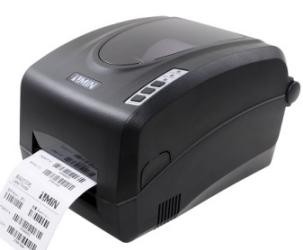 Desktop UHF
JD240TR
4-inch desktop UHF RFID printer. EPC Gen2v2 encoding, on-metal tag support, free LabelSoft. The workhorse for retail tagging programs and pilot runs.
View JD240TR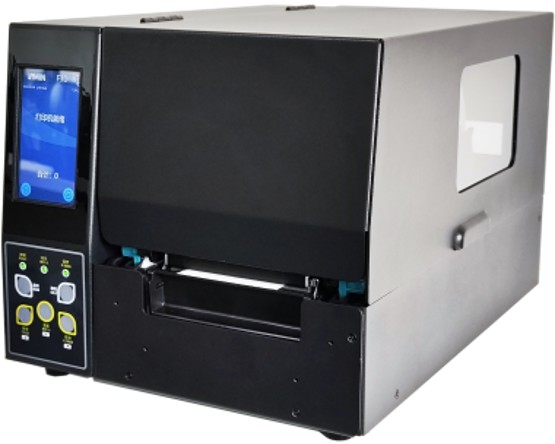 Industrial UHF
JT240TR
Industrial UHF RFID printer with 600 dpi resolution, 1.5 mm media support, and high-volume duty cycles for production lines and distribution centers.
View JT240TR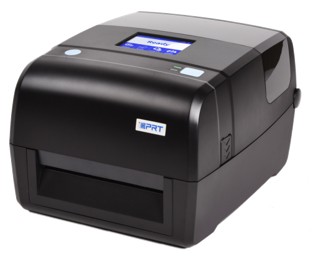 Entry RFID
T430R
Entry-level desktop RFID printer for low-volume tagging and proof-of-concept setups. Budget-friendly, LabelSoft-included.
View T430R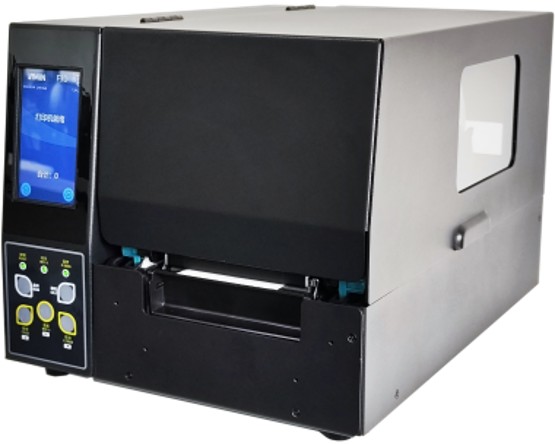 Industrial HF/NFC
JT240THR
If your program also needs HF/NFC authentication tags, the JT240THR is the HF counterpart to the JT240TR — same industrial platform, different frequency.
View JT240THRLineup Comparison
UHF RFID Printer Lineup — Specifications at a Glance
| Specification | JD240TR | JT240TR | T430R | JT240THR |
|---|---|---|---|---|
| Printing method | Direct thermal & Thermal transfer | UHF RFID, Direct thermal & Thermal transfer | Thermal Transfer | HF RFID, Direct thermal & Thermal transfer |
| Resolution | JD240TR-2U: 203 DPI (8 dots/mm); JD240TR-3U: 300 DPI (11.8 dots/mm); JD240TR-6U: 600 DPI (24 dots/mm) | JT240TR-F2: 203 DPI (8 dots/mm); JT240TR-F3: 300 DPI (11.8 dots/mm); JT240TR-F6: 600 DPI (24 dots/mm) | 203 dpi (8 dots/mm), 300 dpi (12 dots/mm) | JT240THR-F2: 203 DPI (8 dots/mm); JT240THR-F3: 300 DPI (11.8 dots/mm); JT240THR-F6: 600 DPI (24 dots/mm) |
| Max. print width | JD240TR-2U: 4.25" (108 mm); JD240TR-3U/6U: 4.15" (105.6 mm) | JT240TR-F2: 4.25" (108 mm); JT240TR-F3/F6: 4.15" (105.6 mm) | 108 mm (203 dpi), 106 mm (300 dpi) | JT240THR-F2: 4.25" (108 mm); JT240THR-F3/F6: 4.15" (105.6 mm) |
| Max. print length | JD240TR-2U: 157.5" (4000 mm); JD240TR-3U/6U: 78.7" (2000 mm) | JT240TR-F2: 157.5" (4000 mm); JT240TR-F3/F6: 78.7" (2000 mm) | 2886 mm (203 dpi), 2524 mm (300 dpi) | JT240THR-F2: 157.5" (4000 mm); JT240THR-F3/F6: 78.7" (2000 mm) |
| Memory | 8 MB Flash ROM, 16 MB SDRAM | 32 MB Flash ROM, 16 MB SDRAM | 128 MB | 32 MB Flash ROM, 16 MB SDRAM |
| Interfaces | RS-232, USB, Ethernet | USB, Ethernet | USB-B, USB Host, Ethernet; Optional Bluetooth 4.0 / BLE, Wi-Fi | USB, Ethernet |
| Weight | JD240TR-2U: 2.85 KGS; JD240TR-3U/6U: 2.95 KGS | 12.5 KGS | 2.85 kg | 12.5 KGS |
Values are reproduced verbatim from each model's specification table on this site; variant-dependent figures are listed per model variant.
Buying Guide
How to Choose a UHF RFID Desktop Printer
1. Confirm your tag standard is EPC Gen2v2 / ISO 18000-63
Retail RFID programs (apparel, sporting goods, general merchandise, FMCG) run on UHF EPC Gen2v2. If your tag spec sheet mentions EPC, Gen2, ISO 18000-63, or RAIN RFID, you need a UHF printer. For brand authentication or NFC consumer engagement, see our HF/NFC RFID printers instead.
2. Match printer class to throughput
Desktop printers (JD240TR) handle hundreds to low-thousands of tags per day — ideal for store back-rooms, pilot programs, and smaller distribution centers. Industrial printers (JT240TR) handle continuous-duty production lines with higher print speeds, larger ribbon capacity, and 600 dpi for small-form-factor tags.
3. Verify on-metal tag support if applicable
Standard inlays encode fine in any UHF printer, but on-metal RFID tags have thicker constructions (often 0.8-1.5 mm). JT240TR supports up to 1.5 mm media; JD240TR handles standard on-metal tags. Send us your tag spec and we'll validate compatibility on the exact media before shipping.
4. Software: free LabelSoft vs paid subscriptions
Many competing printers push recurring software subscriptions. Every JNXRFID printer ships with LabelSoft at no cost — label design, database connectivity, EPC writing rules, and lock/unlock commands. Third-party software that speaks standard print languages also works.
5. Regional frequency regulations
UHF bands differ by region (FCC 902-928 MHz in the Americas; ETSI 865-868 MHz in Europe; 920-922 MHz in China). JNXRFID UHF printers support regional frequency configuration — tell us your deployment regions and we'll ship pre-configured.
Technical resources
Free technical guides for this decision
Desktop UHF printer-encoders differ mainly in two numbers: the media thickness they accept, and the print resolution they offer. Both decide what you can actually run.
- The six numbers that change decisions — the 0.06–0.25 mm versus 1.3–1.5 mm split that decides whether on-metal labels are printable at all
- The pre-purchase checklist — 22 lines to take into any vendor meeting, grouped so you can work through them in order
Download free, no registration: UHF RFID Printer-Encoders: A Buyer's Guide (33 pages) · Tagging Metal Assets with UHF RFID (18 pages).
FAQ
Frequently Asked Questions
What is a UHF RFID desktop printer used for?
UHF RFID desktop printers are used for source-tagging at retail suppliers (apparel, footwear, sporting goods), logistics asset labeling, library and archive tagging, and any workflow that needs EPC Gen2v2 tags commissioned at a stationary workstation. They print the human-readable label and write the EPC code to the inlay in a single pass, with automatic verification of every tag.
What's the difference between UHF and HF/NFC RFID printers?
UHF (860-960 MHz, EPC Gen2v2) is optimized for retail inventory, logistics, and long-range asset tracking — the standard for retail compliance programs. HF/NFC (13.56 MHz, ISO 15693 / 14443A) is used for brand authentication, anti-counterfeiting, product provenance, and NFC customer engagement. Many brands deploy both: UHF for inventory and HF/NFC for authentication. See our HF/NFC printer page for the authentication side.
Can JNXRFID UHF printers encode on-metal RFID tags?
Yes. The JT240TR industrial model supports media up to 1.5 mm thick, which covers most on-metal tag constructions. The JD240TR desktop model handles standard on-metal tags. On-metal tags are a JNXRFID specialty — send your tag specification and we'll validate it on the exact media before shipping.
Are JNXRFID UHF printers compatible with Zebra ZD621R workflows?
JNXRFID printers are designed as an alternative for Zebra ZD621R workflows — compatible label templates and common print languages mean minimal re-engineering. Note: JNXRFID printers use their own RFID modules, not Zebra modules. See our ZD621R alternative comparison for a feature-by-feature breakdown.
What's the minimum order quantity?
Low MOQ. Order a single evaluation unit, test it in your workflow for 1-2 weeks with engineering support, and scale when ready. Most retail compliance programs start with one pilot unit per tagging station.
Test a UHF RFID Desktop Printers in Your Own Workflow
Evaluation unit in 1-2 weeks, engineering support included, low MOQ. Response within 24 hours.
Request an Evaluation Unit