Overview
What Is a Linerless Label Printer?
A linerless label printer runs linerless media: self-wound labels with a silicone release coating instead of a backing liner. There is no liner to peel, collect, or dispose of — and because the labels are continuous, the printer can output any label length when it has an integrated cutter.
In cafés and food service, that flexibility shows up everywhere: order stickers on takeaway packaging, prep-date and expiry labels on containers, cup and wrap labeling, shelf tags for grab-and-go, courier and delivery bag labels, and kitchen tickets that travel with the order. One media roll serves all of them.
There is also a compliance angle: with no backing liner, there is no liner waste stream to manage — a direction aligned with EU PPWR packaging-waste reduction, and a cleaner floor around food prep and packing stations.
Use Case
Café & Food Service: Where Labels Go Wrong at Peak
Ask café and kitchen operators what actually costs them money during a rush, and it is rarely the price of labels. It is what happens when labeling breaks down:
- Order stickers applied to the wrong cup. A mislabeled drink — oat milk instead of whole, decaf instead of regular — means a remake, a refund, or a bad review. When stickers are relayed by hand or shouted across the counter, the error rate is baked into the process. Labels printed directly from the POS or kitchen display remove the relay step: the order record becomes the label, identical every time.
- Handwritten prep and expiry labels nobody can read. Each team member writes dates differently, and use-by dates calculated under pressure invite mistakes — a common root cause of food safety compliance failures. A printer outputs every prep and expiry label in the same legible format with an accurate date, supporting FIFO rotation and HACCP-style workflows.
- Pre-cut stickers that never match the packaging. Espresso cups, sandwich wraps, deli tubs, and delivery bags all need different sizes — so counters accumulate five label stocks and still run out of one. A printer with an integrated cutter outputs each label at the size needed, from roughly 10 mm upward, from a single roll.
- Roll changes and liner waste mid-rush. Lined media runs out sooner and leaves backing paper piling up behind the counter. Linerless media holds roughly 40% more labels per roll, and there is no liner to collect or dispose of.
The JPD240D is built around this workflow: ZPL-II/DPL/EPL auto-emulation connects it to most POS and kitchen display systems without reprogramming; 203 dpi keeps order stickers flowing at 150 mm/s, while the 300 dpi option handles small expiry labels with dense text; and the integrated cutter covers variable-length output from one media roll. Pair the printer with linerless stock matched to your packaging — adhesive and face-stock choice stays with your media supplier.
Print Technology
Why Direct Thermal Is the Right Fit for Café and Food Labels
Direct thermal printing chemically images heat-sensitive media — no ribbon, no ink, no toner. For short-life food service labels, that is exactly the trade you want:
- Nothing to stock but the label roll. No ribbons to reorder, store, or load mid-shift.
- Less maintenance. Fewer consumable swaps means fewer failure points during a lunch rush.
- Cleaner around food. No ribbon dust or ink residue near prep and packing areas.
- Lowest cost per label for short-life media. The media is the only consumable you pay for.
The JPD240D featured below is a direct thermal linerless printer — a deliberate match for order, prep, and delivery labeling. (If you need labels that survive heat, sunlight, or long outdoor exposure, that is a job for thermal transfer or synthetic media — different requirement, different printer.)
Use Case
Shipping & E-commerce: Same Printer, a Different Set of Headaches
Ask fulfillment teams where their packing line stalls and the answer is often the same: the printer. Peak-season order queues back up behind roll changes, jams, and reprints — and the label roll itself becomes inventory to forecast. Linerless printing addresses the four problems pack stations run into most:
- The printer as the bottleneck. Pre-cut label stock means a roll swap every time parcel size changes; variable-length linerless media cuts each label on demand, and a roll without backing liner holds roughly 40% more labels — fewer changes during fulfillment peaks.
- Barcodes that fail to scan. An unreadable or low-contrast barcode sends a parcel to the manual-handling lane or comes back as a failed delivery — carrier surcharges, reshipping costs, and a frustrated customer. Direct thermal output stays high-contrast and resists the moisture and abrasion of conveyor belts and rainy doorsteps, keeping carrier barcodes scannable first pass.
- A shelf of pre-cut label sizes. One roll of linerless media prints everything from the carrier-standard 100 × 150 mm (4 × 6 in) parcel label down to small return tags and packing slips — so you stock one consumable instead of five.
- Liner waste around the pack station. Backing paper piles up fast in high-volume shipping, adding clutter, floor hazards, and disposal cost. Zero liner means a cleaner station and a smaller packaging-waste footprint — the same PPWR-aligned benefit food service gets.
The JPD240D fits this workflow directly: its 114 mm media range covers the 4 × 6 inch carrier label, ZPL-II/DPL/EPL auto-emulation drops into most shipping and multi-carrier platforms without reprogramming, and the integrated cutter handles variable-length labels from one roll. Note that direct thermal labels are best for shipping lives measured in weeks — not for long-term outdoor exposure.
Buying Guide
Seven Things to Check Before You Buy
1. Variable-length printing with an integrated cutter
Cafés and kitchens print many label lengths per shift. Variable-length output with an on-demand cutter — labels from as short as ~10 mm upward — means one roll covers cup stickers, container labels, and bag tags alike.
2. Direct thermal print engine
Confirm the printer is direct thermal for order and food labeling workflows — no ribbon consumable, lower running cost, simpler operation.
3. Peak-hour speed
203 dpi at 150 mm/s keeps order labels flowing when the queue is longest. Slower engines push the bottleneck to the printer exactly when it hurts.
4. More labels per roll
Linerless media holds roughly 40% more labels per roll than lined media of the same diameter — fewer mid-service roll changes, less downtime, less stock on hand.
5. Width range that covers your packaging
A 25.4–114 mm media range covers coffee cups through shipping cartons. Check your smallest and largest label before you buy, not after.
6. Drop-in compatibility with your POS and delivery software
Command-language emulation (ZPL-II, DPL, EPL) lets most POS, kitchen display, and shipping workflows print without reprogramming. USB should be standard; Ethernet, Wi-Fi, and Bluetooth options cover counter and back-of-house placement.
7. Zero liner waste
No backing paper to collect around prep areas, no liner waste stream to pay for — cleaner operations and a smaller packaging-waste footprint.
Recommended
The JPD240D: Built for Linerless Food Service Workflows
Direct Thermal
No ribbon, no ink, no toner — the label roll is the only consumable. Simple to run and lowest cost per label for short-life media.
40% More Labels per Roll
Linerless media packs more usable labels into every roll — fewer mid-service changes during peak hours.
Variable Length + Cutter
Integrated cutter outputs each label at the size needed — one roll serves cups, containers, and delivery bags.
ZPL-II / DPL / EPL
Auto-emulation and drivers for Windows, Linux CUPS, SAP, and BarTender — drop into existing workflows without reprogramming.
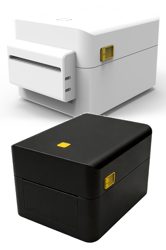 4-inch Linerless · Direct Thermal
JPD240D
Zero liner waste, 40% more labels per roll, variable-length printing with integrated cutter, 203/300 dpi, 150 mm/s max, USB + optional Ethernet/Wi-Fi 5/Bluetooth 5.0.
View JPD240DRelated Guides
- For branded packaging and shelf appeal: Full-color retail label printing
- Browse the range: All JNXRFID label printers
- For RFID smart labels: RFID encoding printers
FAQ
Frequently Asked Questions
What is a linerless label printer?
A label printer that runs linerless media: self-wound labels with a silicone release coating instead of a backing liner. There is no liner to peel, collect, or dispose of, and the same roll can serve many label lengths when the printer has an integrated cutter.
Why is direct thermal the right print technology for cafe and food service labels?
Direct thermal printing needs no ribbon, no ink, and no toner — fewer consumables to stock and reorder, less maintenance, and nothing extra to keep away from food prep areas. For short-life labels like order stickers, prep and expiry labels, and delivery tags, direct thermal is the simplest and lowest-cost-per-label technology. The JPD240D is a direct thermal linerless printer.
Why does an integrated cutter matter for cafe and food service workflows?
Cafes and kitchens print many label lengths in one shift — a cup sticker, a sandwich wrap label, a delivery bag tag. Variable-length printing with an integrated cutter produces each label at exactly the size needed from a single roll, so you stop swapping media between jobs and stop paying for pre-cut stock you barely use.
What does "40% more labels per roll" mean in practice?
Without backing liner, a roll holds more usable labels — around 40% more than lined media of the same diameter. During a lunch rush or fulfillment peak, that means fewer mid-service roll changes and less downtime.
Will a linerless printer work with my POS or shipping software?
Check command-language support. The JPD240D auto-emulates ZPL-II, DPL, and EPL, so most POS, kitchen display, and shipping workflows print without reprogramming. Drivers cover Windows, Linux CUPS, SAP Device Types, and BarTender; connectivity is USB standard with optional Ethernet, Wi-Fi 5, and Bluetooth 5.0.
Can the JPD240D print standard 4 × 6 inch shipping labels?
Yes. The JPD240D accepts media up to 114 mm wide — covering the 101.6 mm (4 in) carrier-standard parcel label — and prints at up to 108 mm width. ZPL-II, DPL, and EPL auto-emulation lets most multi-carrier shipping platforms print without reprogramming, and the integrated cutter produces variable-length labels from a single roll.
Why replace handwritten prep and expiry labels with printed labels?
Handwritten prep labels vary between staff members: illegible under rush, inconsistent in format, and prone to manual use-by date calculation errors — a common source of food safety compliance failures. A direct thermal printer produces consistent, legible labels with accurate dates, supporting FIFO rotation and food safety workflows (HACCP, Natasha's Law-style ingredient and allergen labeling) with far less rework.
Can we test a linerless printer with our own labels and workflows first?
Yes — that is the default path. Send us your label sizes and software setup; we ship one evaluation unit in 1–2 weeks with engineering support, and you run your real service workflow before deciding. No MOQ.
Test the JPD240D in Your Own Café or Kitchen
Send us your label sizes and software setup — we ship one evaluation unit in 1–2 weeks with engineering support. No MOQ. Response within 24 hours.
Request an Evaluation Unit